Lone Worker Safety

The SafeCall Device trusted protection that fits in your pocket

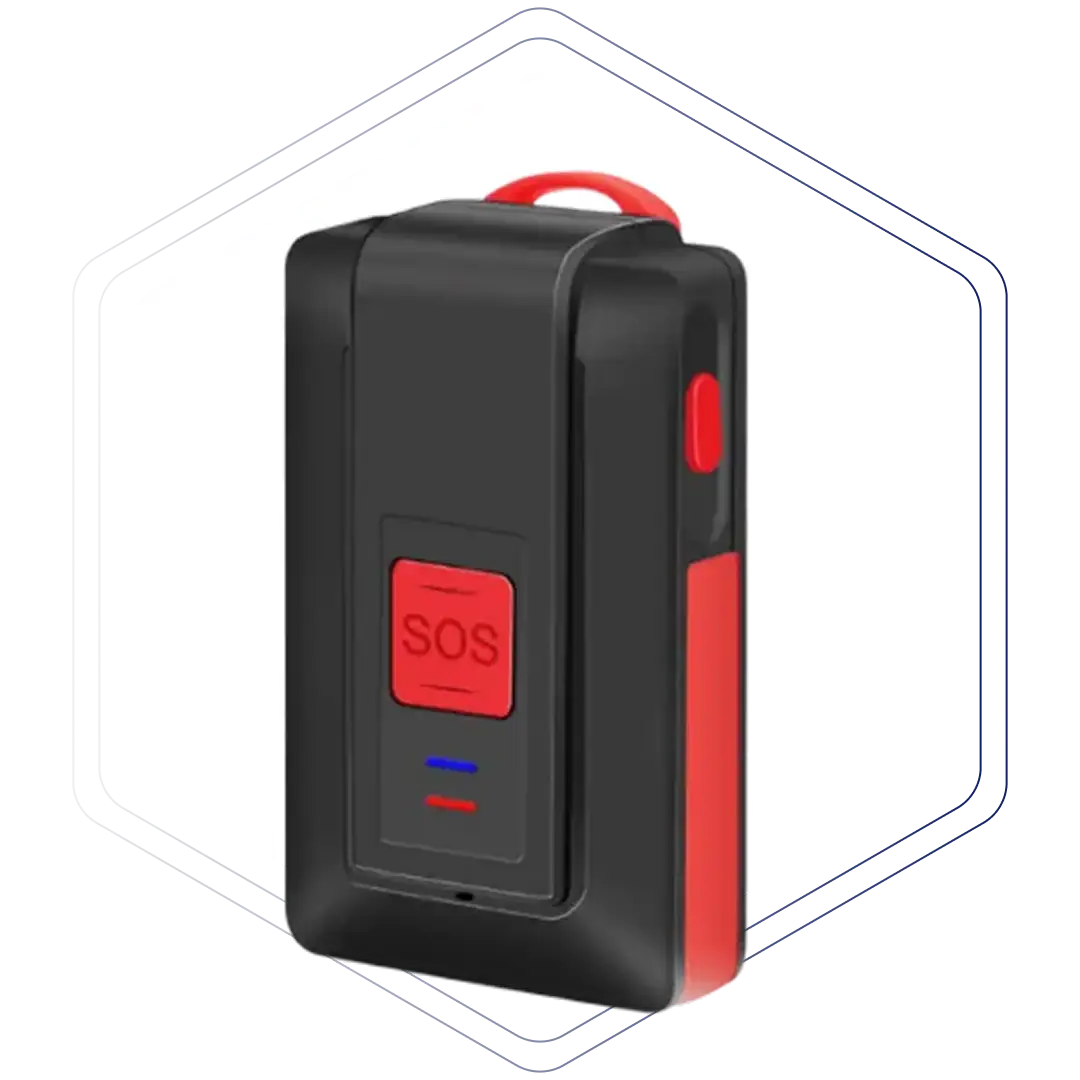
A dedicated panic device the size of a key fob — built for workers in the field who need to call for help fast, discreetly, and without a phone.
banner-img
line
Key Features

Everything in the device nothing extra needed

The SafeCall device is completely independent. Its own SIM, its own OS, its own GPS chip. No Bluetooth. No reliance on the worker's phone.

One-button SOS

Press and hold 2–3 seconds. No passwords, no app, no screen. Works in a pocket or under a jacket.

Live GPS location

Continuously updates and transmits precise coordinates to the monitoring center the moment SOS is pressed.

Background audio recording

Instantly streams audio to the monitoring center so operators can assess the situation before dispatching.

Dedicated OS — no updates

Not affected by Apple or Google OS changes. The device runs its own firmware, always ready.

Full-day battery + 2 chargers

Every device ships with two charging beds — one for the office, one for home. SMS alert at 30% charge.

Wear any way

Clips to a keyring, belt clip, or lanyard. Inconspicuous to bystanders — not recognizable as a phone.
How it works

From panic press to police dispatch - fast

Four simple steps. No app required. Works anywhere there's cellular signal.

01

Press SOS button

Once to confirm and three times to let them know it’s been successfully connected. Nothing further needed.

02

Alarm sent instantly

Via cellular network

03

Center assesses

Trained agent listens to the audio and takes course of action based on your specific action plan

04

Help dispatched

Police directed to exact GPS coordinates if needed.
Technical specs

Device specifications

Device
Specifications
Operating system
Connectivity

Hold red button 2 sec. Device vibrates once to confirm.

3G / cellular (own SIM card — no phone pairing needed)

GPS

Built-in GPS chip; real-time tracking on alarm trigger

Battery life

~1 full day; SMS reminder at 30% charge

Chargers included

2× USB charging beds (office + home)

Water resistance

Splash resistant (IP-rated); not for full immersion

Temperature

SMS warning sent if device exceeds 65°F (e.g., left in hot car)

Operating system

Proprietary — unaffected by iOS / Android updates

Wearing options

Keyring, belt clip (included), lanyard

Privacy options

We built tracking options in from day one

The SafeCall device can be configured to only transmit location when the SOS button is pressed - satisfying workers and unions who are concerned about always-on tracking.

SOS-only location

Device continually updates GPS internally, but discards data unless panic is triggered. Location only leaves the device when it matters most.

User power-off

Workers can power off the device at any time outside working hours. No forced always-on tracking outside of work.

Permitted-use agreements

We support formal agreements between employers and unions that limit the use of location data to safety purposes only.
Products & contracts

Choose the right solution for your team

Start with the app, go all-in with the device, or combine both for complete coverage. All plans include 24/7 monitoring.

App

GuardianMPS App

For organizations wanting safety coverage on existing worker phones — no extra hardware needed.

line-01
What's included
line-01
Best for
Lower-risk teams or organizations piloting the GuardianMPS platform before adding hardware or organizations that already provide work phones and don’t wish to add another piece of technology or hardware for a worker to carry around.
SafeCall Device

SafeCall Device

A dedicated panic device — independent of the worker’s phone. Built for high-risk field roles.
line-01
What's included
line-01
Best for

Higher-risk field workers who need a reliable, phone-independent panic solution that works even if their phone is taken, dead, or out of reach.

App + DEVICE

App + SafeCall Device

The most complete protection. Every scenario your team might face is covered.

line-01
What's included
line-01
Best for
Organizations wanting full team coverage with redundancy — recommended for agencies with a mix of risk levels across field staff.

Frequently asked questions

Do I need to turn off the device to charge it?
No, it can charge while powered on. Turning it off is good practice though, as starting up the device resets everything to its optimum configuration. When you first get your device, it is preferable to leave it charging overnight so that any software updates can be sent. This also allows the new device to get a good connection with the satellites that it will use for calculating its location.
Mistakes happen! When you press the button you will shortly afterwards feel 3 buzzes, which tells you the device is connected and the alarm center is listening. They can’t talk to you, but they can hear you. You need only give your name, your employer name and your pin, and simply say the button was pressed by mistake. You may receive a call from the monitoring center to verify the false alarm. If is NOT a false alarm and someone has forced you press the button, then give your 4-digit duress code. Help will be dispatched immediately.

The device is rated IP67, which means it can be submerged in 3 feet of water (1Meter) for up to 30 minutes. So if you’re out in heavy rain or you drop it in the sink, no need for worry.

You must never open the device, though, as that would permanently break the seal

The device does need a cell signal to send a message. However it communicates by sending small bursts of data; unlike a phone, it is not trying to set up a two-way voice call, which needs much more bandwidth. Consequently it will often be able to connect to the network when a phone cannot.

If the SOS button is pressed in an area with absolutely no cell signal, it will not be able to send a message, and you will not receive the 3-buzz confirmation. However it will repeatedly continue to ping the network until it successfully connects, and then it will raise the alarm. The user will feel three vibrations when it has successfully connected. There is no need to continuously press the button, as each press will be treated as a separate alarm.

Yes! Safecall is meant to be a standalone device and does not require our app to be installed.

PERSONAL SECURITY SOLUTIONS

Start Protecting
Your Teams Today!

Join thousands of organizations worldwide that trust GuardianMPS to keep their mobile workforce safe and connected.

Request a Demo

Experience the power of our personal safety system tailored for your teams.

Download the Safecall Brochure

Get all the technical specifications and whitepapers for our security hardware.