Complete Worker Safety

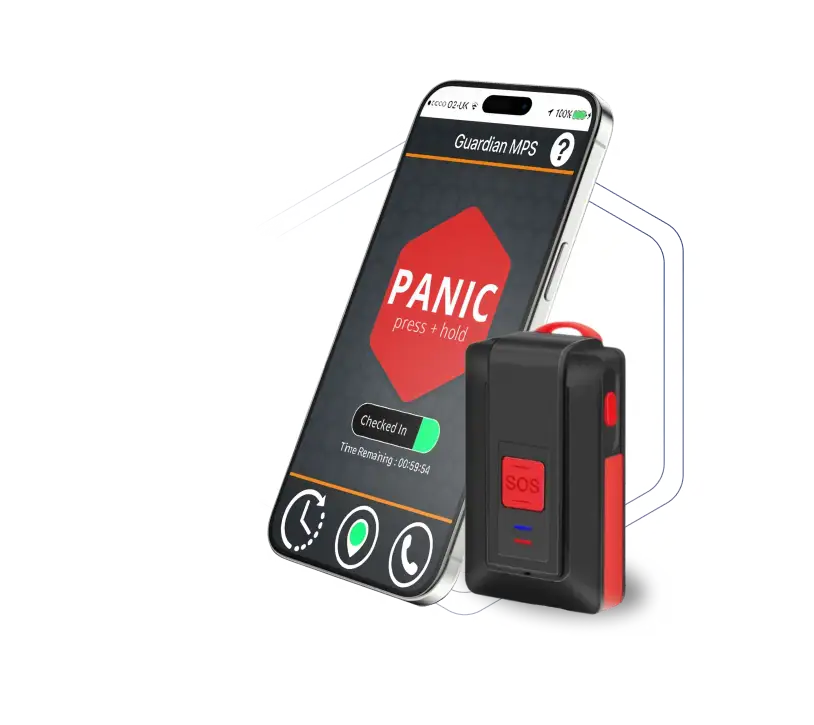
App + SafeCall Device. The most complete lone worker protection

A powerful lone worker safety app for iOS and Android. Check in, log visits, raise panic alarms, and connect to a live monitoring center — all from the phone your team already has.
banner-img
line
line
Key Features

One system, two layers of protection

The app and device are designed to complement each other. Workers stay protected no matter what happens — if one layer can't be reached, the other is always ready.

Panic alarm — two ways

Tap the app SOS or press the device button. Workers use whichever is reachable in the moment – no wrong choice.

Check-in / check-out

Workers log visit address, floor, and expected duration via the app. Overdue alerts fire automatically to the monitoring center.

Live GPS on alarm

Both the app and device transmit precise GPS coordinates the moment an alarm is triggered — so help always knows where to go.

Works without a phone

The SafeCall device has its own SIM and OS. If the phone is dead, taken, or out of reach, the device still connects to the monitoring center.

Discrete activation

Supervisors get full visibility into check-ins, alarms, and worker activity through a dedicated client portal.

Flexible privacy options

Seven tracking configurations — including SOS-only location on the device — satisfy workers, unions, and employers across any organization.

How it works

From panic press to police dispatch - fast

Four simple steps. No app required. Works anywhere there's cellular signal.

01

Press SOS button

Once to confirm and three times to let them know it’s been successfully connected. Nothing further needed.

02

Alarm sent instantly

Via cellular network

03

Center assesses

Trained agent listens to the audio and takes course of action based on your specific action plan

04

Help dispatched

Police directed to exact GPS coordinates if needed.
How it works

App and device working together through a shift

The app handles the routine. The device is always ready for the unexpected. Together they give the monitoring center everything they need to respond fast.

01

Check in via app

Logs visit address, floor, and expected duration via app.

02

Device stays ready

SafeCall updates GPS silently — in pocket or on keyring, out of sight.

03

Incident occurs

Worker presses device button or taps app SOS — whichever is reachable.

04

Full response

Monitoring center has visit data from app + live GPS from device.

What each product brings

Better together — each fills the other's gaps

Alone, each product is a strong safety solution. Combined, they leave no scenario uncovered.

Guardian’s key insight: To dispatch help in an emergency, we need to know where someone is — but we’ve built every configuration option you need to make that acceptable to your workforce.

GuardianMPS App

Check-in / check-out

Log every visit with address, floor, and expected duration. Overdue alerts fire automatically.

Visit logging

Text or voice notes per visit — even with GPS off. Sent to the monitoring center on alarm.

In-app panic alarm

One-tap SOS with GPS and audio. Works on any iOS or Android phone.

7 privacy configurations

Mandatory, de-activation, permitted-use, static, Guardian-admin, voice-only, and no-app options.

SafeCall Device

One-button SOS

Hold 2–3 seconds. No screen, no app, no eye contact needed. Works from a pocket.

Completely independent

Own SIM, own OS, own GPS. Works even if the phone is dead, taken, or out of reach.

SOS-only location

GPS updates internally but is discarded unless panic is triggered — satisfying union privacy concerns.

Full-day battery + 2 chargers

Ships with office and home charging beds. SMS alert at 30% battery.
Products & contracts

Choose the right solution for your team

Start with the app, go all-in with the device, or combine both for complete coverage. All plans include 24/7 monitoring.

App

GuardianMPS App

For organizations wanting safety coverage on existing worker phones — no extra hardware needed.

line-01
What's included
line-01
Best for

Lower-risk teams or organizations piloting the platform before adding hardware.

Recommended

App + SafeCall Device

The most complete protection. Dual-layer coverage – every scenario your team might face is accounted for.

line-01
What's included
line-01
Best for
Organizations wanting complete coverage across all risk levels — with a built-in failsafe if either solution is ever out of reach.

DEVICE

SafeCall Device

A dedicated panic device — independent of the worker’s phone. Built for high-risk field roles.

line-01
What's included
line-01
Best for
Higher-risk workers who need phone-independent protection — without the check-in features.

Frequently asked questions

How do the device and the phone communicate?

The short answer is, they don’t. They are designed to be completely independent of each other. The device has its own sim card and communicates directly with the Guardian servers. The phone is not involved at all, in any way. This also means that there is no Bluetooth involved, which is a good thing : Bluetooth is a radio standard – it was never meant for a safety-related purpose like this.


So, if your phone or device battery runs out, or if you lose your phone, or forget it, the device will still work as intended. Equally, if you lose your device, your Guardian app will still be available on your phone.


You will sometimes get a call on your phone after using the device, but in that case the device has connected with the Guardian server and it is the server, not the device, that is calling your phone.

No. It is a good practice though, as starting up resets everything to its optimum configuration. When you first get your device it is preferable to leave it charging overnight so that any software updates can be sent.

No. It is a good practice though, as starting up resets everything to its optimum configuration. When you first get your device it is preferable to leave it charging overnight so that any software updates can be sent.

No. It is a good practice though, as starting up resets everything to its optimum configuration. When you first get your device it is preferable to leave it charging overnight so that any software updates can be sent.

No. It is a good practice though, as starting up resets everything to its optimum configuration. When you first get your device it is preferable to leave it charging overnight so that any software updates can be sent.

No. It is a good practice though, as starting up resets everything to its optimum configuration. When you first get your device it is preferable to leave it charging overnight so that any software updates can be sent.

Actually, no; there is a plain old telephone number that you can call. Guardian will recognize your number and put you through to the check-in server, where you can leave a voice message including the address where you will be. If you don’t check-in again later, and we can’t reach you, emergency service will be sent to the address that you leave in the message. We can’t track you with GPS in this case, but at least we will know where you were going. Also, we can’t do this from any phone – it has to be the phone that you were registered with on the system. There is also a plain old telephone number than can be used to raise a panic alarm without an app or a device.

PERSONAL SECURITY SOLUTIONS

Start Protecting
Your Teams Today!

Join thousands of organizations worldwide that trust GuardianMPS to keep their mobile workforce safe and connected.

Request a Demo

Experience the power of our personal safety system tailored for your teams.

Download the Safecall Brochure

Get all the technical specifications and whitepapers for our security hardware.