Mobile Worker Safety
A powerful lone worker safety app for iOS and Android. Check in, log visits, raise panic alarms, and connect to a live monitoring center — all from the phone your team already has.
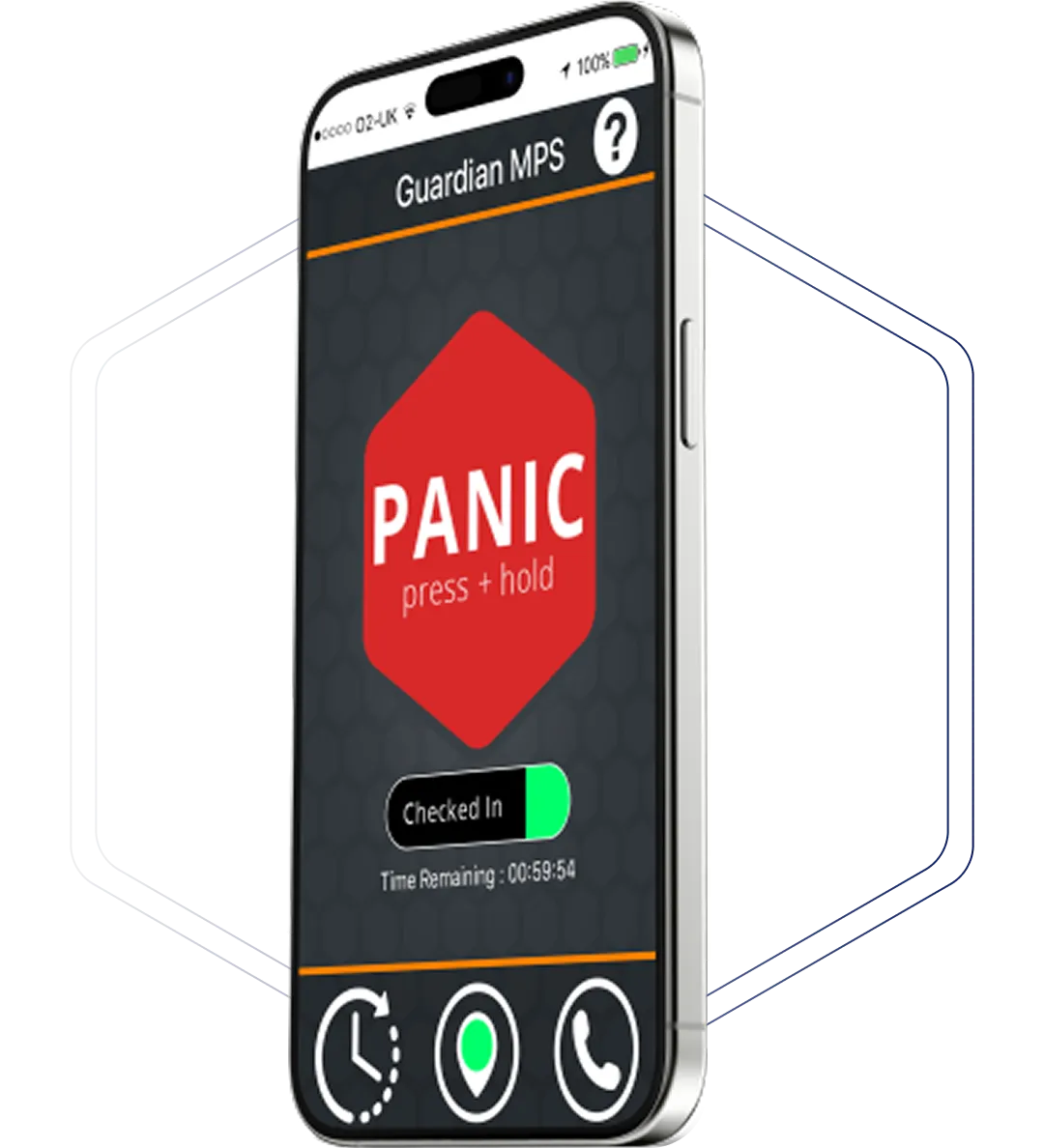

Key Features
GuardianMPS turns the phone your workers already carry into a full personal safety system. Panic alarms, check-ins, visit logging, and live monitoring - all in one app.
One tap to activate SOS. Background audio and GPS location are sent immediately to the 24/7 monitoring center.
Workers log the start and end of every visit. Overdue check-outs trigger automatic alerts to the monitoring center.
Workers can log visit details by text or voice — address, floor, expected duration — even with GPS turned off.
Multiple tracking configurations to meet employer duty-of-care requirements and worker or union privacy concerns.
Supervisors get full visibility into check-ins, alarms, and worker activity through a dedicated client portal.
Every alarm is received by trained operators who assess, contact, and dispatch emergency services if needed.
How it works
Four simple steps. No app required. Works anywhere there's cellular signal.
Once to confirm and three times to let them know it’s been successfully connected. Nothing further needed.
Privacy & tracking
Guardian was designed with this tension in mind from day one. Workers and unions get flexibility. Employers get duty-of-care coverage. We offer seven configurations to find the right balance for your organization.
Not all options offer the same level of safety — ideally GuardianMPS needs to know where help should be sent, even if the victim’s location is dynamically changing.
Products & contracts
Start with the app, go all-in with the device, or combine both for complete coverage. All plans include 24/7 monitoring.
App + Device
The most complete protection. Every scenario your team might face is covered.

Organizations wanting full team coverage with redundancy – recommended for agencies with a mix of risk levels across field staff.
GuardianMPS App
For organizations wanting safety coverage on existing worker phones — no extra hardware needed.
Lower-risk teams or organizations piloting the GuardianMPS platform before adding hardware.
DEVICE
A dedicated panic device – independent of the worker’s phone. Built for high-risk field roles.
Higher-risk field workers who need a reliable, phone-independent panic solution that works even if their phone is taken, dead, or out of reach.
All apps use the battery to some extent, and that’s true of Guardian too. The great majority of users do not notice an extra battery drain. The heaviest demand comes from the GPS location system, but that’s a phone function, not a Guardian function, so the difference should be minimal.
Yes, they can. We can provide a phone number that can be used to dial into the service. The user can then leave a voice message with details of where they will be and for how long. After that, the service will operate in the usual way and will attempt to contact the user if they don’t call in again to check out before the time expires. It’s important to note though that we may not have up-to-date GPS locations if it’s used like this, so if emergency services are dispatched, they will be sent to the location that the user left in the voice-mail. It’s also possible to dial in from a different phone, if you know your pin number.
That’s really a management decision. We recommend it because it’s an opportunity to update Guardian before going into a location where using the phone may quickly become difficult. Not all of our customers use it that way though – some just rely on pressing the panic button in the app if a bad situation develops.
Guardian uses location information to locate the user if they check in and don’t check out, or if they press a panic button, whether in the app or on the device. We can’t wait for an incident to happen before switching on the location because it could take several minutes for a satellite to find the device. We do have customers who reach agreement between employees and employers that the data can only be used for location purposes and use for disciplinary purposes is explicitly excluded. It’s not a technical solution in Guardian, however – it’s an agreement between the parties. It is possible to use Guardian with tracking disabled, as explained above, but it is not recommended and significantly weakens the system’s ability to respond effectively to an incident. It’s really a “better than nothing” approach for someone who refuses to be tracked.
PERSONAL SECURITY SOLUTIONS
Join thousands of organizations worldwide that trust GuardianMPS to keep their mobile workforce safe and connected.
Experience the power of our personal safety system tailored for your teams.
Get all the technical specifications and whitepapers for our security hardware.
"*" indicates required fields